#
最近接项目要求,要在svn主干上创建分支,用分支来进行程序的bug修改,而主干上进行新功能的开发。分支上的bug修改完,发布后,可以合并到主干上。项目程序可以在主干和分支之间进行切换,来实现主干和分支的同时维护。
1.创建分支
创建分支实际上就是将程序copy一份到指定的分支目录,如下图示:

在项目名称上点击右键,弹出菜单,选择“Team”,再选择“Branch/Tag”,弹出下面的页面:

上图中的“Copy to URL”填写创建新分支的路径地址,后面会将程序copy到该目录下,形成新的分支。点击“Next”:

选择当前最新的版本,点击“Next”

如果勾选了上图下面的switch working copy to new branch/tag,eclipse的程序项目会自动切换到分支下。这里我们不选择,待会自己切换。
这样就创建了一个1.0的分支
2.合并
可以从主干合并到分支,也可以从分支合并到主干,根据需要可以选择合适的选项,如下图:

上图中的选项:
1) 从主干合并到分支
2) 从分支合并到主干
3) 将主干上的修改合并到分支
4) 合并2个分支到主干
5) 从主干到分支,手工指定不需要合并的修改
6) 从主干到分支,手工指定要合并的修改

上图显示没有任何修改,所以不用进行合并。
3.切换
在项目名称上点击右键,选择“Team” –> “switch to another Branch/Tag/Revision”。

选择需要切换的目的地址,点击ok即可。
这样,在项目里就可以在主干和若干分支间进行任意切换,来实现对不同版本/分支的程序进行修改提交操作。
参考:
Overview of CollabNet Merge Client
https://desktop-eclipse.open.collab.net/servlets/ProjectProcess?pageID=MEuUjb&freeformpage=Merge%20Client
eclipse中将SVN分支合并到主干的方法
http://www.darrenfang.com/merge-branches-to-trunk-in-eclipse.html
世界杯(FIFA World Cup)即国际足联世界杯,是世界上最高荣誉、最高规格、最高水平、最高含金量、最高知名度的足球比赛,与奥运会并称为全球体育两大最顶级赛事,甚至是转播覆盖率超过奥运会的全球最大体育盛事。
本届世界杯由巴西举办,时间:6月13日至7月4日,为(shua)期(ping)一个月。五次夺冠的巴西向着第六颗星进击,据说集齐七颗星即可召唤出神龙,五星天朝方显高瞻远瞩,美帝星条旗表示你们统统弱爆了。
 这是一个激情澎湃的时刻
这是一个心潮涌动的瞬间
但又是一个bī格漫天的年代
别问我怎么梅西转会去了阿根廷
别问我为什么世界杯只有32只球队
也别问我为什么乔丹没有入选美国大名单
更别问我为什么没有中国队,这TM2018年世界杯预选赛都还没开始呢
 说到这里,我想我有必要先向大家普及一下本次本次杯赛的相关情况
首先是本次杯赛的32强赛程安排:


 那么,稍后我将逐一为大家介绍各个参赛队做一个民间分析。
 既然是盛宴,其实我们大家都心知“肚”明,大部分球迷都是去……


 那么,作为一个有素质,有教养的攻略,我不得不提醒大家:
看球第一,猛吃第二;
那么,作为一个有素质,有教养的攻略,我不得不提醒大家:
看球第一,猛吃第二;
美食再美,且吃且珍;
体型若重,心寒……心寒……寒……
谨慎起见,请各位女性观众仔细阅读如下注意事项!!!
注意事项:本届世界杯没有贝克汉姆也没有卡卡,更没有巴萨和皇马,来自地球的韩国队也没有李敏镐和都敏俊。
那么,请各位系好身边的安全带,我们即将起航。
 五星巴西永远是夺冠热门,这次加上天时地利人和,他们拥有最大的机会夺取巴西世界杯,也承受着最大的关注和最大的压力。
直接晋级世界杯缺乏强对抗的比赛没有阻碍他们的前进,联合会杯出色的发挥让人眼前一亮,最后让西班牙耻辱性的输掉了决赛。他们在比赛中显示出的凝聚力让人惊叹不已。斯科拉里的执教能力毋庸置疑,他夺取世界杯的经验将对这支年轻的巴西给予很大的帮助。在关键位置的阵容深度不亚于德国,他们是世界杯上所有球队都希望击败的对手。
别忘了他们还有最火热的球迷!
 德国队的阵容深度让人感觉十分可怕,即使有几个人受伤完全不影响球队的整体实力,特别是赫迪拉令人惋惜的伤病,如果是其他国家,那么这样一名有实力的球员受伤的确会给教练带来很大的苦恼,特别是在世界杯之前,而对于德国来说,找到同样实力的球员似乎不是问题。赫迪拉的受伤给了本德兄弟很大的机会,而且他两也完全有能力填补他的缺席,京多安,克洛斯也能打拖后组织核心。如果穆勒和格策受伤,他们还有罗伊斯,德拉克斯勒和波多尔斯基顶上。
整支球队的能力,阵容深度只会给勒夫带来幸福的烦恼,最后带哪11个人上场估计是勒夫头疼的问题。
他们应该是四支最有希望夺得大力神杯的球队,如果低于四强的成绩,那么德国人一定不会满意的。纪录不会说谎,36年来德国队从未跌出8强,世界杯是他们明年唯一的目标。
PS:为什么世界杯不跟助攻王发一个类似金靴奖的东东!
 西班牙作为卫冕冠军,理应是夺冠大热门,已经连续获得了三届大赛的冠军(不算联合会杯)。西班牙不缺球星,不缺顶级球员,不缺经验,不缺信心,他们有可能成为巴西之后第二个连续两届获得世界杯冠军的国家。不过锋无力的情况是否会被迭戈科斯塔的加盟改变呢?催眠战术是否会有改变?低迷的伊涅斯塔和老去的哈维还能创造奇迹么?德国和巴西的强势会是他们夺冠的最大敌人。
 如果阿根廷在巴西夺世界杯,那估计全巴西人都要疯了。
即使没有煤球王,阿根廷的阵容在纸面上也不错,状态火热的阿圭罗,拉维奇和迪玛利亚的攻击前场能够给球队提供足够的火力,不过不可否认的是自从1990年以来,阿根廷都是让球迷心碎的那支球队。
8强应该是他们最低的目标,过去四届世界杯他们有三次完成了这个目标。不过煤球王的荣誉簿上还缺一个大力神杯,布拉特打脸的发言是否会在世界杯帮煤球王一把呢,让我们拭目以待吧!
PS:就煤球王那水平,打世界杯,阿奎罗甩他几条街,你们说是不是?
 哥伦比亚以南美区第二的身份强势杀入世界杯,这是16年来他们第一次回到世界杯决赛圈。他们只有一次小组出线的经历,但是这不能妨碍这支汇集了年轻,速度,力量和超强个人能力的球队在世界杯上带来惊喜。
晋级8强是他们的目标,如果法尔考和罗德里格斯有着最佳状态的话他们能走的更远。
 在蹂躏完约旦以后,乌拉圭终于舒舒服服地进入了世界杯。
乌拉圭在世界杯预选赛中的状态来的有点完,他们在最后5场比赛比赛中赢了4场,将他们带到了第五的位置获得了附加赛资格,最后仅仅以净胜球劣势排在厄瓜多尔之后。要知道他们在前11场比赛中仅仅只赢了3场。
补充:
首先今年的世界杯在南美比赛这对乌拉圭是很大的优势,其次这支球队有很丰富的大赛经验,自从2011年美洲杯夺冠以来主力阵容没有很大的变动。整个球队技战术很成熟,并且作风顽强,还有一个不错的主教练,还拥有全世界最好的两个前锋。
综上所述,乌拉圭如果进入大赛状态是一支十分难击败的球队,特别进入大赛模式的乌拉圭更加可怕。他们有可能无法拥有最佳阵容出战,老将和伤病都无法避免,但是依然是一支很有韧性的球队。如果全队保持健康,晋级四强希望很大。
 每一届大赛,意大利总是很有威胁的那支球队,即便是在不被看好的情况下。
他们的锋线看上去很美,年轻,充满活力与激情,尽管他们在世界杯预选赛期间略显挣扎在10场比赛中赢了6场平了4场。
他们是四强的有利竞争者,但是他们似乎在中场缺一个明星球员,有时候进攻上欠缺节奏,对于最后的冠军争夺希望还不是那么大。
 比利时已经被世界各大足球专家看成是今年世界杯的最大的黑马,而且有可能爆冷拿下世界杯,如果你在玩fifa或者fm的话这个阵容的确相当抢眼,不过现实是残酷的。
哈球王,卢卡库,本特克,梅腾斯……等等拥有这超强天赋的攻击球员充斥着整个比利时的阵容,光看到名字就让你感到兴奋,但是整支球队还没有经历大赛的考验,压力和韧性是这支球队最大的问题。防守端他们有世界上最好的两个门将,也有个人能力最强的中后卫之一,看上去整个球队攻守平衡。心理和战术纪律性是这支群星璀璨的比利时最大的敌人,如果发挥不错,有可能进入四强。
 在世界杯南美区预选赛上智利以第三名的身份杀入世界杯,但是和厄瓜多尔不同的是,他们的主客场战绩都相当均衡。
在16场比赛中他们打入了29球,攻击力排在南美区预选赛第二位,这说明进攻是他们的强项,但是同时防守是他们的弱点16场比赛也被打入了25球,攻守相当不平衡。
智利球员的个人技术都相当不错,出众的个人能力能在胶着的比赛中帮他们打开局面。在温布利的胜利应该对智利整个球队都是很大的激励,如果再16强阶段不碰到前四的强队,很有可能进入最后的8强。如果他们最后杀入8强,那么这是自从62年以来他们最好的成绩,不过在此之前他们需要大大改善自己的防守,如果改变不了,那最大的冷门可能就要出现在他们身上了。
 10年世界杯没有拿到冠军,这支球队的气数已经走到了尽头,前场还是那么几个老人再苦苦支撑,后场依然不堪一击。无冕之王要想再今年改变无冠的命运只能是痴人做梦了。
虽然荷兰在世界杯预选赛表现不俗,但是看看他们的分组,几乎没有遇到有难度的抵抗,虽然在10场预选赛中只被进了5球,看看对阵的球队,就不想多说什么了。他们的进攻依然可以很犀利很华丽,但是要想走的更远,对比其他顶级球队实在差的太多,不过8强应该没问题。
 虽然英格兰最终以小组第一的身份晋级了世界杯,但是过程绝对不如结果看到的那么容易。
当人们对他们寄予厚望重新冲刺世界杯的时候,智利和德国给这支欧洲中国队浇了一盆冷水。毋庸置疑的是,英格兰的确有一些个人能力很强的球员,并且也不缺精气神。但是无可否认的是,他们失败的大赛历史证明这一切很难被改变,如果最后进入了4强绝对需要举国欢庆。进入8强算是比较正常的目标,如果低于8强基本没脸回国了,英国小报骂死你,如果高于8强,那就谢天谢地谢亚龙吧!
 哎,回头看看日韩的阵容就算是有再多的仇恨,也不得不佩服他们在国际足坛的成长。
在亚洲杯十强赛B组以超强的统治力小组出线,仅仅输了一场比赛,在8场比赛中只被打入了5个进球。今年的世界杯16强绝对不是痴人做梦。
日本有很多富有才华的技术型中场,本田圭佑,香川真司和长谷部诚已经是欧洲成名的中场大将,他们的对球都有着很强的控制力,而且传球和想象力也相当出色,在扎切罗尼的指导下整支球队的战术组织纪律也令人刮目相看。在进攻线上,他们有很多富有潜力的年轻球员,23岁的前锋大迫勇也将有可能给人带来惊喜。
总体来说他们的最佳11人阵容能和世界很多强队匹敌,不过一旦碰上比他们更加强壮,更加善于控球的球队,他们能更好的打出高质量的防守和反击么,防守将决定日本最终能走的多远。如果一切顺利,8强对日本来说绝对是有可能的,就算无法取得佳绩,他们也是一支充满观赏性的球队。
 俄罗斯再一次回到了世界杯的舞台,这一次率领他们的是金牌教头卡佩罗。
这支俄罗斯进攻火力十足,并且有能力应付各种强队,防守也游刃有余。但是压力也许是他们最大的敌人,他们必须从小组出线为这个国家重新带来失去的荣誉,要知道上一次他们能从世界杯小组出线还要追溯到1986年。
大多数在这支国家队的球员来自本国联赛,主要由泽尼特和莫斯科两大俱乐部组成。
对于这支俄罗斯来说最大的敌人就是自己,如果能更好的把握住进球机会,8强绝对不是梦。
 虽然在去年的非洲杯又没有夺冠,但是科特迪瓦依然是是这个大洲最强的球队。
在击败塞内加尔进军世界杯以后,他们已经将目光瞄准了世界杯淘汰赛阶段的比赛。上一次他们仅仅以微弱优势被淘汰出局。
科特迪瓦的阵容群星云集,球队传奇亚亚图雷和德罗巴是当仁不让的老大,再辅以热尔维尼奥,敦比亚,卡劳伯尼,克洛图雷这些欧洲名将,科特迪瓦的值得期待。不过他们需要在球队整体的技战术水平上有所提高。
如果他们能保持自己的进攻火力,他们就能创造自己的奇迹。
 如果硬要找个规律,这个法国还有可能打入今年的世界杯决赛,98年他们夺得世界杯冠军,02年小组被淘汰,06年又拿到了亚军,10年又被小组淘汰,那么14年很有可能进入世界杯决赛啦,不过这种情况只能说中大彩了。
虽然在世界杯预选赛中仅仅位于西班牙之后排名第二也不是那么让人难以理解,但是关键问题在于他们没有拿出任何让人信服的比赛,特别到最后还要靠萨科这样的球员来拯救击败乌克兰,简直不忍直视。
当然法国的实力毋庸置疑,全队有很多技术出众,创造力强并且让人激情四射的球员,里贝里又是当今足坛的顶尖球员之一。不过一旦这些球星爆发,谁能知道这支不被看好的法国能走多远呢!
 在波黑短短几年的建国历史里,他们的国家第一次进入了世界杯的决赛圈。不过看看他们的阵容,他们应该对这次世界杯充满了决心和目的。
他们有一个稳定的主力阵容,有一套成熟的攻防体系,看看他们的球员,守门员是英超门神贝戈维奇,两大神锋伊比舍维奇和哲科将为波黑的进攻提供火力,在中场拥有着很多创造力中场,现在在罗马炙手可热的皮亚尼奇将成为提供主要进攻组织者,前德甲助攻王米西莫维奇也是不容忽视的。皮亚尼奇定位球功力将会是决定比赛的关键人物,在世界杯这样重大的比赛中,一个定位球将有可能改变整场比赛的走势。
因为没有以前世界杯经历的对比,也没有很丰富的对战其他大州球队的经验,预测他们能走的多远实在是十分困难。不过小组出线对他们来说应该不难,波黑是世界杯值得期待的一直球队,有动力有激情有天赋!
 瑞士可以称的上各项大赛上的常客,他们有不错的实力,但是离顶级球队还是有那么点的差距。
对于很多顶级球队来说瑞士的经常是他们的噩梦,他们有严密的战术纪律,有天赋的球员,老道的主教练,他们的世界杯预选赛以不败结束直接晋级32强,在希斯菲尔德掌舵的这几年中,瑞士取得的进步有目共睹。
扎卡,沙奇里和因勒的崛起,在这支顽强的球队中注入了才华和星味,不过他们缺乏一个中锋和一个强力中后卫。
不过他们现在的世界排名让他们在世界杯抽签分组中占据了一个有力的位置,几乎以他们现在的实力,出线不成问题,他们应该将目标放在8强才能算的上真正的成功。他们上一次进入8强还要追溯到1954年。
 棒子的出线可以真正称得上幸运,仅仅以净胜球的优势淘汰了乌兹别克斯坦。
不过他们的整体实力处在一个上升期,在德甲效力的孙兴民和具滋哲将给棒子的进攻带来很大的提升,并且他们都年轻还有很大的上升空间,后防线上刚刚赢得亚冠的广州恒大主力中后卫金英权将是后防线上的领军人物。在配以这赛季在卡迪夫状态很好的金普炅,棒子的整体实力还是不容小觑的,再加上某些不确定因素(大家都懂的)。
在过去的三届世界杯中他们有两次从小组出线,不过最大极限也是16强,不会再走的更远了。
 字母罗和伊布的巅峰对决,终于以字母罗封神的表现,让葡萄牙惊险晋级世界杯。葡萄牙也是真正意义上字母罗一个人的球队。葡萄牙的球迷认为只要有字母罗一切皆有可能,但是世界杯可不是预选赛,他们要获得好成绩得把球队的状态调整到最佳。但是很遗憾的是,整支球队没有那样的实力。不过葡萄牙的世界杯之旅很大程度上决定于他们的抽签,估计他们可以赢得小组的头两场比赛,然后顺利进入16强。不过看上去很简单事实上不那么容易,在此之前球队的战术还得好好研究一番。
 厄瓜多尔是一个很奇怪的球队,他们在世界杯南美区预选赛高居第四位直接晋级了世界杯决赛圈,让乌拉圭去打了附加赛。但是他们超强的主场战斗力,在世界杯将不复存在。
在预选赛的8场主场比赛中7场取得了胜利,一场是平局,但是他们在客场一场未胜,平了3场输了5场。
如果他们遇上压迫型球队,进攻犀利的强队,那么他们羸弱的防守就会给他们带来致命伤害。另外一个方面如果允许他们打出防守反击,他们在两翼的速度将是所有球队的噩梦。
他们有可能进入16强,不过8强就不要奢望了。
 尼日利亚令人信服地击败了埃塞俄比亚进入了世界杯决赛圈,不过如果他们想让世人重新关注非洲雄狮,他们还得做的更好。
尼日利亚的阵容虽然不比从前,但也不少球星,像艾姆尼科,摩西,米克尔这样欧洲的成名球星将是决定他们世界杯成败的关键人物。虽然他们的比赛缺乏节奏的变化,不过Stephen Keshi执教下球队技战术渐渐成熟,如果他们发挥出应有的水平,小组出线可能还是很大的。
 虽然在预选赛起步有点蹒跚,但是美国很快以小组头名的身份强势杀进世界杯。不过在中北美取得这样的成绩对于美国来说也是正常的,他们的阵容相当不错,今年的世界杯是对他们最好的检验。1930的世界杯是美国第一次打入世界杯8强,也许这次他们想走的更远。
 墨西哥如愿搭上了末班车,不过他们总体表现是令人失望的。他们在预选赛最后两场惊险拿到了附加赛的资格,有如此多富有天赋的攻击球员,而整个预选赛10场比赛只打入了7个进球,进攻问题是最需要解决的问题。
当然如果能解决进攻的问题,墨西哥是一支相当不错的球队,但是缺乏真正的巨星级人物在关键场次为球队挺身而出。
主教练Miguel Herrera的用人也匪夷所思,他的宗旨是不征召海外球员,只选本国联赛的球员组成国家队,他觉得这样的球队战术凝聚力高。在过去5次的世界杯经历中,墨西哥都进入了16强,这对他们来说是很大的激励。
 在附加赛中击败冰岛,让克罗地亚如愿来到巴西,不过他们的头号射手曼朱基齐的停赛,对他们的世界杯之旅是一次致命打击。他有可能错过整个小组赛的比赛,由于第二回合对战冰岛被出示红牌下场。
克罗地亚的中场是他们最引以为傲的地方,他们的中场才华横溢,富有创造力,对任何球队都是很大的威胁,问题在于主教练Niko Kovac的战术能不能将这些球星融入在一起,发挥出最大的战斗力。
虽然他们进入了世界杯,但是没有曼朱基齐的克罗地亚得分能力将被放大,他们能否从小组出线也被打上了大大的问号。
 在战胜埃及以后,加纳连续三届进入了世界杯决赛圈。
全世界的目光都会关注这支非洲劲旅,要知道他们第一次参加世界杯就进入了16强,第二次就进入了8强!球队中名将众多武艺蒙,博阿滕,阿萨莫阿是领军人物,还有在马赛效力的阿尤兄弟,加纳的中场堪称强大,但是他们最大的问题在于防守,而且缺乏箭头人物,虽然在对战埃及的两回合比赛中打入了7球。
如果无法提高他们的防守质量和锋无力的问题,他们可能无法在小组中出线。
 这是希腊第一次连续两届晋升世界杯决赛圈的比赛,不过这也仅仅是他们第三次世界杯之旅。
希腊的优点就是团队战术纪律好,意志力顽强,但是缺乏才华是他们最大的问题。他们如果要在世界杯中做的更好的话,必须从防守做起,伺机反击,是他们最大的机会。
在10场预选赛中,希腊打入12球,只被进了4球,可见他们的策略依然沿用着防守反击,即使在对阵列支敦士登这样的业余级别球队时他们也只是客场1-0,主场2-0小比分获胜。不过观众应该很讨厌他们吧,在世界杯中一共获得过一场比赛胜利,小组出线不容乐观。
 喀麦隆轻松迈过了突尼斯这一关进军了世界杯,但是很明显他们已经不是昔日的非洲猎豹了。整个球队的团队氛围相当的差,并且已经没有了世界顶级球星,虽然有一些不错的球员例如埃托奥,宋,恩库鲁和马蒂普。
进球是他们最大的问题,在对阵利比亚,刚果和多哥的比赛中6场比赛仅仅打入8球,要知道这些都是公认的弱旅。在埃托奥身边的锋线搭档是韦伯不过他也是仅有的国家队进球达到两位数的球员。
自从没有了卡梅尼,2年半以来他只打了12场联赛,喀麦隆的门将位置捉襟见肘。
自从他们上一次小组出线已经过去20年了,这一次赔率显示他们可能要再加上4年了。
 自从1982和1986年以来,这是阿尔及利亚第一次进入世界杯决赛圈,而且从来没有从小组出线过。
阿尔及利亚应该是非洲参加世界杯最弱的球队了,如果他们希望有所发挥就要寄希望于布拉希米,哈桑耶布和费古利的发挥了。
布拉希米应该是特别需要注意的那个,他的脚下技术相当出色,并且突破和传球都能撕开对手的防线。但是全队的攻防两端都有很大的问题,注定是世界杯的过客。
 哥斯达黎加在预选赛中有这十分强势的表现,在中北美预选赛中有这最好的防守纪录,在10场比赛中只被打入7球。
虽然没有什么特别大牌的明星,但是布莱恩鲁伊兹和乔尔坎贝尔的实力能大大提升他们的进球效率。
不过世界杯对于他们来说目标和洪都拉斯差不多,赢一场就能开心回家了,不过要是分到一个不错的小组,哥斯达黎加也许能创造惊喜。
 在这次世界杯预选赛中洪都拉斯表现出色,他们已经连续两届进军世界杯决赛圈的比赛了,在次之前他们只有在1982年参加过世界杯。
但是要说事实的话,他们的晋级只能归咎于墨西哥状态太差,但是他们也的确有一些才华横溢的球员增加了球队的整体实力。
在中国联赛效力的卡洛斯 科斯特利,英超球星帕拉西奥斯和埃斯皮诺萨是这支球队的领军人物,球队也不乏一些拥有众多国际比赛经验的老队员。
对于他们来说最现实的目标就是能在世界杯赢一场球,除非有什么奇迹发生,或者有什么令人震惊的分组……
 澳大利亚在亚洲的实力仅次于韩日,获得一个世界杯资格应该不成问题,但是他们在预选赛的表现十分挣扎,要知道十强赛b组仅仅只有日本一支强队,而约旦队在两回合对战乌拉圭的比赛中业余的表现,可见实力有多差。
澳大利亚的问题在于队伍年龄老化,卡希尔,布雷西亚诺,尼尔这些高龄球员依然在阵中,只有极少数的25岁以下年轻球员能进入一线队阵容。
这届世界杯应该是这些老队员的谢幕演出,但是锋无力的情况可能比缺少年轻球员更加严重,如果澳大利亚能进入淘汰赛,估计更大博彩公司都要哭了。
 伊朗在亚洲区十强赛A组力压韩国和乌兹别克斯坦斯坦以小组头名出线,实力可见一斑。
但是他们在世界杯的影响力有限,过往成绩也不太理想没有一次小组出线的经历,最好的成绩是98年世界杯在小组取的了他们在世界杯的唯一一场胜利。
现在球队中有Masoud Shojaei,Javad Nekounam和Reza Ghoochannejhad在欧洲顶级联赛效力,虽然不缺乏一些不错的球员,但是总体实力还是不能给其他球队造成麻烦。最弱一队非伊朗莫属。
http://www.cloudera.com/content/cloudera-content/cloudera-docs/CDH4/latest/CDH4-Installation-Guide/cdh4ig_topic_4_4.html
http://www.cnblogs.com/xuesong/p/3604080.html
http://www.linuxidc.com/Linux/2013-12/94180.htm
卸载
http://www.cnblogs.com/shudonghe/articles/3133290.html
安装文件:
http://www.cloudera.com/content/support/en/downloads/download-components/download-products.html?productID=4ZFrtT9ZQN
- change to no password
sudo chmod +w /etc/sudoers
sudo vi /etc/sudoers
ufuser ALL=(ALL) NOPASSWD: ALL
sudo chmod -w /etc/sudoers
- change disable
sudo vi /etc/selinux/config
SELINUX=disabled
sudo reboot
- add to /etc/hosts
sudo vi /etc/hosts
10.0.0.4 ufhdp001.cloudapp.net ufhdp001
10.0.0.5 ufhdp002.cloudapp.net ufhdp002
- download bin
wget http://archive.cloudera.com/cm4/installer/latest/cloudera-manager-installer.bin
- run the bin
chmod 755 cloudera-manager-installer.bin
sudo ./cloudera-manager-installer.bin
简单说,分布式是以缩短单个任务的执行时间来提升效率的,而集群则是通过提高单位时间内执行的任务数来提升效率。
例如:如果一个任务由10个子任务组成,每个子任务单独执行需1小时,则在一台服务器上执行改任务需10小时。
采用分布式方案,提供10台服务器,每台服务器只负责处理一个子任务,不考虑子任务间的依赖关系,执行完这个任务只需一个小时。
而采用集群方案,同样提供10台服务器,每台服务器都能独立处理这个任务。假设有10个任务同时到达,10个服务器将同时工作,10小后,10个任务同时完成,这样,整身来看,还是1小时内完成一个任务!
集群概念
1. 两大关键特性
集群是一组协同工作的服务实体,用以提供比单一服务实体更具扩展性与可用性的服务平台。在客户端看来,一个集群就象是一个服务实体,但事实上集群由一组服务实体组成。与单一服务实体相比较,集群提供了以下两个关键特性:
· 可扩展性--集群的性能不限于单一的服务实体,新的服务实体可以动态地加入到集群,从而增强集群的性能。
· 高可用性--集 群通过服务实体冗余使客户端免于轻易遇到out of service的警告。在集群中,同样的服务可以由多个服务实体提供。如果一个服务实体失败了,另一个服务实体会接管失败的服务实体。集群提供的从一个出 错的服务实体恢复到另一个服务实体的功能增强了应用的可用性。
2. 两大能力
为了具有可扩展性和高可用性特点,集群的必须具备以下两大能力:
· 负载均衡--负载均衡能把任务比较均衡地分布到集群环境下的计算和网络资源。
· 错误恢复--由于某种原因,执行某个任务的资源出现故障,另一服务实体中执行同一任务的资源接着完成任务。这种由于一个实体中的资源不能工作,另一个实体中的资源透明的继续完成任务的过程叫错误恢复。
负载均衡和错误恢复都要求各服务实体中有执行同一任务的资源存在,而且对于同一任务的各个资源来说,执行任务所需的信息视图(信息上下文)必须是一样的。
3. 两大技术
实现集群务必要有以下两大技术:
· 集群地址--集 群由多个服务实体组成,集群客户端通过访问集群的集群地址获取集群内部各服务实体的功能。具有单一集群地址(也叫单一影像)是集群的一个基 本特征。维护集群地址的设置被称为负载均衡器。负载均衡器内部负责管理各个服务实体的加入和退出,外部负责集群地址向内部服务实体地址的转换。有的负载均 衡器实现真正的负载均衡算法,有的只支持任务的转换。只实现任务转换的负载均衡器适用于支持ACTIVE-STANDBY的集群环境,在那里,集群中只有 一个服务实体工作,当正在工作的服务实体发生故障时,负载均衡器把后来的任务转向另外一个服务实体。
· 内部通信--为了能协同工作、实现负载均衡和错误恢复,集群各实体间必须时常通信,比如负载均衡器对服务实体心跳测试信息、服务实体间任务执行上下文信息的通信。
具有同一个集群地址使得客户端能访问集群提供的计算服务,一个集群地址下隐藏了各个服务实体的内部地址,使得客户要求的计算服务能在各个服务实体之间分布。内部通信是集群能正常运转的基础,它使得集群具有均衡负载和错误恢复的能力。
集群分类
Linux集群主要分成三大类( 高可用集群, 负载均衡集群,科学计算集群),高可用集群( High Availability Cluster),负载均衡集群(Load Balance Cluster),科学计算集群(High Performance Computing Cluster)
具体包括:
Linux High Availability 高可用集群:普通两节点双机热备,多节点HA集群,RAC, shared, share-nothing集群等;Linux Load Balance 负载均衡集群:LVS等....;Linux High Performance Computing 高性能科学计算集群:Beowulf 类集群....;分布式存储;其他类linux集群:如Openmosix, rendering farm 等..
详细介绍
1. 高可用集群(High Availability Cluster)
常见的就是2个节点做成的HA集群,有很多通俗的不科学的名称,比如"双机热备", "双机互备", "双机".
高可用集群解决的是保障用户的应用程序持续对外提供服务的能力。 (请注意高可用集群既不是用来保护业务数据的,保护的是用户的业务程序对外不间断提供服务,把因软件/硬件/人为造成的故障对业务的影响降低到最小程度)。
2. 负载均衡集群(Load Balance Cluster)
负载均衡系统:集群中所有的节点都处于活动状态,它们分摊系统的工作负载。一般Web服务器集群、数据库集群和应用服务器集群都属于这种类型。
负载均衡集群一般用于相应网络请求的网页服务器,数据库服务器。这种集群可以在接到请求时,检查接受请求较少,不繁忙的服务器,并把请求转到这些服务器上。从检查其他服务器状态这一点上看,负载均衡和容错集群很接近,不同之处是数量上更多。
3. 科学计算集群(High Performance Computing Cluster)
高性能计算(High Perfermance Computing)集群,简称HPC集群。这类集群致力于提供单个计算机所不能提供的强大的计算能力。
高性能计算分类
高吞吐计算(High-throughput Computing)
有一类高性能计算,可以把它分成若干可以并行的子任务,而且各个子任务彼此间没有什么关联。象在家搜寻外星人( SETI@HOME -- Search for Extraterrestrial Intelligence at Home )就是这一类型应用。这一项目是利用Internet上的闲置的计算资源来搜寻外星人。SETI项目的服务器将一组数据和数据模式发给Internet上 参加SETI的计算节点,计算节点在给定的数据上用给定的模式进行搜索,然后将搜索的结果发给服务器。服务器负责将从各个计算节点返回的数据汇集成完整的 数据。因为这种类型应用的一个共同特征是在海量数据上搜索某些模式,所以把这类计算称为高吞吐计算。所谓的Internet计算都属于这一类。按照 Flynn的分类,高吞吐计算属于SIMD(Single Instruction/Multiple Data)的范畴。
分布计算(Distributed Computing)
另一类计算刚好和高吞吐计算相反,它们虽然可以给分成若干并行的子任务,但是子任务间联系很紧密,需要大量的数据交换。按照Flynn的分类,分布式的高性能计算属于MIMD(Multiple Instruction/Multiple Data)的范畴。
4. 分布式(集群)与集群的联系与区别
分布式是指将不同的业务分布在不同的地方。而集群指的是将几台服务器集中在一起,实现同一业务。分布式中的每一个节点,都可以做集群。而集群并不一定就是分布式的。
举例:就比如新浪网,访问的人多了,他可以做一个群集,前面放一个响应服务器,后面几台服务器完成同一业务,如果有业务访问的时候,响应服务器看哪台服务器的负载不是很重,就将给哪一台去完成。
而分布式,从窄意上理解,也跟集群差不多, 但是它的组织比较松散,不像集群,有一个组织性,一台服务器垮了,其它的服务器可以顶上来。
分布式的每一个节点,都完成不同的业务,一个节点垮了,哪这个业务就不可访问了。
传统MySQL+ Memcached架构遇到的问题
实际MySQL是适合进行海量数据存储的,通过Memcached将热点数据加载到cache,加速访问,很多公司都曾经使用过这样的架构,但随着业务数据量的不断增加,和访问量的持续增长,我们遇到了很多问题:
1.MySQL需要不断进行拆库拆表,Memcached也需不断跟着扩容,扩容和维护工作占据大量开发时间。
2.Memcached与MySQL数据库数据一致性问题。
3.Memcached数据命中率低或down机,大量访问直接穿透到DB,MySQL无法支撑。
4.跨机房cache同步问题。
众多NoSQL百花齐放,如何选择
最近几年,业界不断涌现出很多各种各样的NoSQL产品,那么如何才能正确地使用好这些产品,最大化地发挥其长处,是我们需要深入研究和思考的问题,实 际归根结底最重要的是了解这些产品的定位,并且了解到每款产品的tradeoffs,在实际应用中做到扬长避短,总体上这些NoSQL主要用于解决以下几 种问题
1.少量数据存储,高速读写访问。此类产品通过数据全部in-momery 的方式来保证高速访问,同时提供数据落地的功能,实际这正是Redis最主要的适用场景。
2.海量数据存储,分布式系统支持,数据一致性保证,方便的集群节点添加/删除。
3.这方面最具代表性的是dynamo和bigtable 2篇论文所阐述的思路。前者是一个完全无中心的设计,节点之间通过gossip方式传递集群信息,数据保证最终一致性,后者是一个中心化的方案设计,通过类似一个分布式锁服务来保证强一致性,数据写入先写内存和redo log,然后定期compat归并到磁盘上,将随机写优化为顺序写,提高写入性能。
4.Schema free,auto-sharding等。比如目前常见的一些文档数据库都是支持schema-free的,直接存储json格式数据,并且支持auto-sharding等功能,比如mongodb。
面对这些不同类型的NoSQL产品,我们需要根据我们的业务场景选择最合适的产品。
Redis适用场景,如何正确的使用
前面已经分析过,Redis最适合所有数据in-momory的场景,虽然Redis也提供持久化功能,但实际更多的是一个disk-backed的功 能,跟传统意义上的持久化有比较大的差别,那么可能大家就会有疑问,似乎Redis更像一个加强版的Memcached,那么何时使用 Memcached,何时使用Redis呢?
如果简单地比较Redis与Memcached的区别,大多数都会得到以下观点:
1 Redis不仅仅支持简单的k/v类型的数据,同时还提供list,set,zset,hash等数据结构的存储。
2 Redis支持数据的备份,即master-slave模式的数据备份。
3 Redis支持数据的持久化,可以将内存中的数据保持在磁盘中,重启的时候可以再次加载进行使用。
抛开这些,可以深入到Redis内部构造去观察更加本质的区别,理解Redis的设计。
在Redis中,并不是所有的数据都一直存储在内存中的。这是和Memcached相比一个最大的区别。Redis只会缓存所有的 key的信息,如果Redis发现内存的使用量超过了某一个阀值,将触发swap的操作,Redis根据“swappability = age*log(size_in_memory)”计 算出哪些key对应的value需要swap到磁盘。然后再将这些key对应的value持久化到磁盘中,同时在内存中清除。这种特性使得Redis可以 保持超过其机器本身内存大小的数据。当然,机器本身的内存必须要能够保持所有的key,毕竟这些数据是不会进行swap操作的。同时由于Redis将内存 中的数据swap到磁盘中的时候,提供服务的主线程和进行swap操作的子线程会共享这部分内存,所以如果更新需要swap的数据,Redis将阻塞这个 操作,直到子线程完成swap操作后才可以进行修改。
使用Redis特有内存模型前后的情况对比:
VM off: 300k keys, 4096 bytes values: 1.3G used
VM on: 300k keys, 4096 bytes values: 73M used
VM off: 1 million keys, 256 bytes values: 430.12M used
VM on: 1 million keys, 256 bytes values: 160.09M used
VM on: 1 million keys, values as large as you want, still: 160.09M used
当 从Redis中读取数据的时候,如果读取的key对应的value不在内存中,那么Redis就需要从swap文件中加载相应数据,然后再返回给请求方。 这里就存在一个I/O线程池的问题。在默认的情况下,Redis会出现阻塞,即完成所有的swap文件加载后才会相应。这种策略在客户端的数量较小,进行 批量操作的时候比较合适。但是如果将Redis应用在一个大型的网站应用程序中,这显然是无法满足大并发的情况的。所以Redis运行我们设置I/O线程 池的大小,对需要从swap文件中加载相应数据的读取请求进行并发操作,减少阻塞的时间。
如果希望在海量数据的环境中使用好Redis,我相信理解Redis的内存设计和阻塞的情况是不可缺少的。
补充的知识点:
memcached和redis的比较
1 网络IO模型
Memcached是多线程,非阻塞IO复用的网络模型,分为监听主线程和worker子线程,监听线程监听网络连接,接受请求后,将连接描述字 pipe 传递给worker线程,进行读写IO, 网络层使用libevent封装的事件库,多线程模型可以发挥多核作用,但是引入了cache coherency和锁的问题,比如,Memcached最常用的stats 命令,实际Memcached所有操作都要对这个全局变量加锁,进行计数等工作,带来了性能损耗。
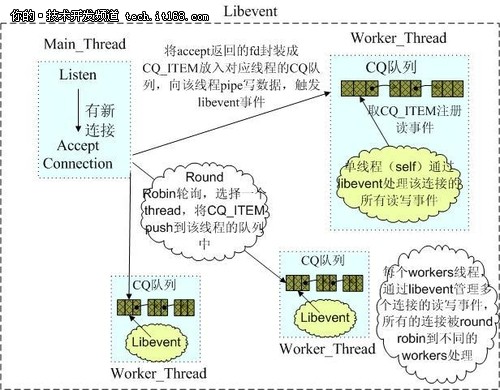
(Memcached网络IO模型)
Redis使用单线程的IO复用模型,自己封装了一个简单的AeEvent事件处理框架,主要实现了epoll、kqueue和select,对于单纯 只有IO操作来说,单线程可以将速度优势发挥到最大,但是Redis也提供了一些简单的计算功能,比如排序、聚合等,对于这些操作,单线程模型实际会严重 影响整体吞吐量,CPU计算过程中,整个IO调度都是被阻塞住的。
2.内存管理方面
Memcached使用预分配的内存池的方式,使用slab和大小不同的chunk来管理内存,Item根据大小选择合适的chunk存储,内存池的方 式可以省去申请/释放内存的开销,并且能减小内存碎片产生,但这种方式也会带来一定程度上的空间浪费,并且在内存仍然有很大空间时,新的数据也可能会被剔 除,原因可以参考Timyang的文章:http://timyang.net/data/Memcached-lru-evictions/
Redis使用现场申请内存的方式来存储数据,并且很少使用free-list等方式来优化内存分配,会在一定程度上存在内存碎片,Redis跟据存储 命令参数,会把带过期时间的数据单独存放在一起,并把它们称为临时数据,非临时数据是永远不会被剔除的,即便物理内存不够,导致swap也不会剔除任何非 临时数据(但会尝试剔除部分临时数据),这点上Redis更适合作为存储而不是cache。
3.数据一致性问题
Memcached提供了cas命令,可以保证多个并发访问操作同一份数据的一致性问题。 Redis没有提供cas 命令,并不能保证这点,不过Redis提供了事务的功能,可以保证一串 命令的原子性,中间不会被任何操作打断。
4.存储方式及其它方面
Memcached基本只支持简单的key-value存储,不支持枚举,不支持持久化和复制等功能
Redis除key/value之外,还支持list,set,sorted set,hash等众多数据结构,提供了KEYS
进行枚举操作,但不能在线上使用,如果需要枚举线上数据,Redis提供了工具可以直接扫描其dump文件,枚举出所有数据,Redis还同时提供了持久化和复制等功能。
5.关于不同语言的客户端支持
在不同语言的客户端方面,Memcached和Redis都有丰富的第三方客户端可供选择,不过因为Memcached发展的时间更久一些,目前看在客 户端支持方面,Memcached的很多客户端更加成熟稳定,而Redis由于其协议本身就比Memcached复杂,加上作者不断增加新的功能等,对应 第三方客户端跟进速度可能会赶不上,有时可能需要自己在第三方客户端基础上做些修改才能更好的使用。
根据以上比较不难看出,当我们不希望数据被踢出,或者需要除key/value之外的更多数据类型时,或者需要落地功能时,使用Redis比使用Memcached更合适。
关于Redis的一些周边功能
Redis除了作为存储之外还提供了一些其它方面的功能,比如聚合计算、pubsub、scripting等,对于此类功能需要了解其实现原理,清楚地 了解到它的局限性后,才能正确的使用,比如pubsub功能,这个实际是没有任何持久化支持的,消费方连接闪断或重连之间过来的消息是会全部丢失的,又比 如聚合计算和scripting等功能受Redis单线程模型所限,是不可能达到很高的吞吐量的,需要谨慎使用。
总的来说Redis作者是一位非常勤奋的开发者,可以经常看到作者在尝试着各种不同的新鲜想法和思路,针对这些方面的功能就要求我们需要深入了解后再使用。
总结:
1.Redis使用最佳方式是全部数据in-memory。
2.Redis更多场景是作为Memcached的替代者来使用。
3.当需要除key/value之外的更多数据类型支持时,使用Redis更合适。
4.当存储的数据不能被剔除时,使用Redis更合适。
开源大数据框架Apache Hadoop已经成了大数据处理的事实标准,同时也几乎成了大数据的代名词,虽然这多少有些以偏概全。
根据Gartner的估计,目前的Hadoop生态系统市场规模在7700万美元左右,2016年,该市场规模将快速增长至8.13亿美元。
但是在Hadoop这个快速扩增的蓝海中游泳并非易事,不仅开发大数据基础设施技术产品这件事很难,销售起来也很难,具体到大数据基础设施工具如 Hadoop、NoSQL数据库和流处理系统则更是难上加难。客户需要大量培训和教育,付费用户需要大量支持和及时跟进的产品开发工作。而跟企业级客户打 交道往往并非创业公司团队的强项。此外,大数据基础设施技术创业通常对风险投资规模也有较高要求。
尽管困难重重,Hadoop创业公司依然如雨后春笋冒出,除了Cloudera、Datameer、DataStax和MapR等已经功成名就的 Hadoop创业公司外,最近CIO杂志评出了2014年十大最值得关注的Hadoop创业公司,了解这些公司的产品和商业模式对企业大数据技术创业者和 大数据应用用户来说都非常有参考价值:
一、Platfora

业务:所提供的大数据分析解决方案能够将Hadoop中的原始数据转换成可互动的,基于内存计算的商业智能服务。
简介:创立于2011年,迄今已募集6500万美元。
入选理由:Platfora的目标是简化复杂难用的Hadoop,推动Hadoop在企业市场的应用。Platfora的做法是简化数据采集和分析 流程,将Hadoop中的原始数据自动转化成可以互动的商业智能服务,无需ETL或者数据仓库。(参考阅读:Hadoop只是穷人的ETL)
二、Alpine Data Labs

业务:提供基于Hadoop的数据分析平台
简介:创立于2010年,迄今累计融资2350万美元。
入选理由:复杂的高级分析和机器学习应用通常都需要脚本和代码开发高手实现,这进一步推高了数据科学家的技术门槛。实际上大数据企业高管和IT经理都没时间也没兴致学习编程技术,或者去了解复杂的Hadoop。Alpine Data通过SaaS服务的方式大幅降低了预测分析的应用门槛。
三、Altiscale

业务:提供Hadoop即服务(HaaS)
简介:创立于2012年3月,迄今融资1200万美元。
入选理由:大数据正在闹人才荒,而通过云计算提供Hadoop相关服务无疑是普及Hadoo的一条捷径,根据TechNavio的估计,2016年 HaaS市场规模将高达190亿美元,是块大蛋糕。但是HaaS市场的竞争已经日趋激烈,包括亚马逊EMR、微软的Hadoop on Azure,以及Rackspace的Hortonworks云服务等都是重量级玩家,Altiscale还需要与Hortonworks、 Cloudera、Mortar Data、Qubole、Xpleny展开直接竞争。
四、Trifacta

业务:提供平台帮助用户将复杂的原始数据转化成干净的结构化格式供分析使用。
简介:创立于2012年,迄今融资1630万美元。
入选理由:大数据技术平台和分析工具之间存在一个巨大的瓶颈,那就是数据分析专家需要花费大量精力和时间转化数据,而且业务数据分析师们往往也并不 具备独立完成数据转化工作的技术能力。为了解决这个问题Trifacta开发出了“预测互动”技术,将数据操作可视化,而且Trifacta的机器学习算 法还能同时观察用户和数据属性,预测用户意图,并自动给出建议。Trifata的竞争对手是Paxata、Informatica和CirroHow。
五、Splice Machine

业务:提供面向大数据应用的,基于Hadoop的SQL兼容数据库。
简介:创立于2012年,迄今融资1900万美元。
入选理由:新的数据技术使得传统关系型数据库的一些流行功能如ACID合规、交易一致性和标准的SQL查询语言等得以在廉价可扩展的Hadoop上 延续。Splice Machine保留了NoSQL数据库所有的优点,例如auto-sharding,容错、可扩展性等,同时又保留了SQL。
六、DataTorrent

业务:提供基于Hadoop平台的实时流处理平台
简介:创立于2012年,2013年6月获得800万美元A轮融资。
入选理由:大数据的未来是快数据,而DataTorrent正是要解决快数据的问题。
七、Qubole

业务:提供大数据DaaS服务,基于“真正的自动扩展Hadoop集群”。
简介:创立于2011年,累计融资700万美元。
入选理由:大数据人才一将难求,对于大多数企业来说,像使用SaaS企业应用一样使用Hadoop是一个现实的选择。
八、Continuuity

业务:提供基于Hadoop的大数据应用托管平台
简介:创立于2011年,累计获得1250万美元融资,创始人兼CEO Todd Papaioannou曾是雅虎副总裁云架构负责人,去年夏天Todd离开Continuuity后,联合创始人CTO Jonathan Gray接替担任CEO一职。
入选理由:Continuuity的商业模式非常聪明也非常独特,他们绕过非常难缠的Hadoop专家,直接向Java开发者提供应用开发平台,其 旗舰产品Reactor是一个基于Hadoop的Java集成化数据和应用框架,Continuuity将底层基础设施进行抽象处理,通过简单的Java 和REST API提供底层基础设施服务,为用户大大简化了Hadoop基础设施的复杂性。Continuuity最新发布的服务——Loom是一个集群管理方案,通 过Loom创建的集群可以使用任意硬件和软件堆叠的模板,从单一的LAMP服务器和传统应用服务器如JBoss到包含数千个节点的大规模的Hadoop集 群。集群还可以部署在多个云服务商的环境中(例如Rackspace、Joyent、Openstack等)而且还能使用常见的SCM工具。
九、Xplenty

业务:提供HaaS服务
简介:创立于2012年,从Magma风险投资获得金额不详的融资。
入选理由:虽然Hadoop已经成了大数据的事实工业标准,但是Hadoop的开发、部署和维护对技术人员的技能依然有着极高要求。Xplenty 的技术通过无需编写代码的Hadoop开发环境提供Hadoop处理服务,企业无需投资软硬件和专业人才就能快速享受大数据技术。
十、Nuevora

业务:提供大数据分析应用
简介:创立于2011年,累计获得300万早期投资。
入选理由:Nuevora的着眼点是大数据应用最早启动的两个领域:营销和客户接触。Nuevora的nBAAP(大数据分析与应用)平台的主要功 能包括基于最佳时间预测算法的定制分析应用,nBAAP基于三个关键大数据技术:Hadoop(大数据处理)、R(预测分析)和Tableau(数据可视 化)
作为一位设计师,会经常追寻新鲜有趣的设计工具,这些工具会提高工作的效率,使得工作更有效, 最重要的是使工作变得更方便。非常肯定的说,随着日益增长的工具和应用的数量,设计和开发变得越来越简单了。其中最普遍使用的最终框架 之一是 Bootstrap,它在 2013 年特别流行。如果你是位设计师,你可能会接触过它,甚至是使用过它。如果你是 Bootstrap 的使用者或者是相关功能的用户,这篇文章非常的适合你!
这里总共列举了 12 款最好的 Bootstrap 设计工具,这些都能很好的简化大家的工作。希望大家能从这些列表中找到适合自己的,在评论跟大家分享一下使用的感想和其他类似的工具,Enjoy :)

Bootstrap Designer 是一个在线工具,不需要下载就可以使用。用户可以使用它创建漂亮和迷人基于 Bootstrap 框架的 HTML5 模板。

如果用户想结合先进高级的 web 技术和 Bootstrap,可以尝试一下 Get Kickstrap。这款特别的工具非常高大上,可以运行数据库驱动的 web 应用程序,而且还不用任何的后台哦 :D

这个工具拥有非常多样化的库,集成了其他 Bootstrap 基础插件,框架和库。

这个特别的工具能帮助用户轻松创建各种类型的按钮,用户只需要输入 CSS 类到新的按钮中,并且选择相应的颜色值就可以了。当需要使用的时候,只需要复制粘贴就能轻松创建漂亮的按钮了。

这个工具能在浏览器中运行,这个非常基础的工具能帮助在小团队工作的开发者和设计者建立非常真实的 web 元素。

用户只需要使用拖拽界面构建器就可以轻松创建前端代码。

这是一个开源的工具,而且非常容易安装和使用。

这是一款在线主题生成器和 Twitter Bootstrap 的 web 设计工具。用户可以在设计 webapp 时生成和预览主题。

这个特别的工具允许用户创建非常个性化的字体,通过非常舒适的命令行方式。

这是另外一个基于 CSS 的 Twitter Bootstrap,让用户能很好的在 WordPress 网站上使用 Twitter Bootstrap JavaScript 库。

这是个非常灵活和简单的框架,用户可以创建现代化和经典的 web 应用。同时,也可以定义类似 Windows 8 的风格和感觉。

这是另外一个基于 Twitter Bootstrap 的工具,可以运行一个平滑风格,组件可以包含 PSD 文件的 UI。使用这个特殊的工具可以创建出非常有创意的 UI。
摘要: 在本次教程中,我们将创建含有三个节点的群集。第一个节点是主节点,第二个节点是Failover节点,第三个节点是仲裁节点。1. 安装Mongo并设置配置文件安装3台服务器并调整配置文件/etc/mongod.conf:1#Select your replication set name2replSet=[replication_set_name]3#Selec...
阅读全文